Porting Raylib to a $60 GBA clone
Making new games for old consoles has long been a joy for indie game developers, a practice nicknamed “homebrewing”. This fandom has arguably created a market for retro gaming handhelds: low-power devices designed & manufactured today but meant for emulating consoles from the past. Steward Fu’s homepage alone lists 187 such products.
Game Boy Advance (GBA), a handheld from 25 years ago, is one of homebrewers’ favorite target platform. Earlier this year, I dabbled in this hobby by hacking an idle game created in 2023. As it was perhaps apparent in my previous post, that was my first exposure to game development.
One may ask: What if you want to learn to make games, but aren’t feeling too nostalgic? Raylib is usually the answer. It’s a cross-platform framework that aims at putting fun into video game development. And it’s popular: on itch.io alone, more than 700 games are made with Raylib.
Won’t it be exciting to port Raylib to those budget handhelds, so that those developers can enjoy their creations on more tangible, dedicated gaming devices — with joy sticks, D-pads, and everything? This shouldn’t be hard, since many of those retro gaming handhelds run some kinds of Linux. To make it more interesting, I decided to raise the bar and aim at rendering 3D scenes.
First iteration
I started with the Miyoo Mini Flip (MMF) that I bought in March. It presented an exciting challengeSnippets of probe programs, their console logs on MMF, and more notes are available here. :
- The SSD202D SoC (dual-core ARM Cortex-A7) has no 3D GPU.
- EGL/GLES libraries are on disk, but
eglInitializefailed. - The Simple DirectMedia Layer (SDL) library, which I highly regard, couldn’t create a GL context on MMF.
- The only hint I could find is
/dev/fb0, which represents the framebufferThe framebuffer is a region in the memory, but a Linux kernel driver exposes at/dev/fb0, as if it’s a separate device. This virtual device is often referred to as “FBDEV”. .
But besides /dev/fb0, MMF’s Linux gives so little on the graphics stack that, had the OS been absent, it probably wouldn’t make a difference at all.
It’s funny that, only 4 months before I started this project, Raylib actually started adding support for OS-less situations. Referred to as PLATFORM_MEMORY in the makefile, this configuration draws directly to the framebuffer. This is almost exactly what I needed. I just needed to wire it up with /dev/fb0. The plan is thus:
- Render the next frame in the program’s memory space
- Copy that frame into
/dev/fb0 - Tell the display to “flip the buffer”A prober program told me that this framebuffer is actually double the size of the actual display (actual 640x480; virtual 640x960). This means we are dealing with a double buffering situation, requiring us to “pan the display” from one buffer to the other upon every frame (using
FBIOPAN_DISPLAY).
Coding agent soon gave me a workable build script. But unfortunately, even when it’s as rudimentary as a spinning cube, the scene can barely surpass 7 FPS on my MMP:
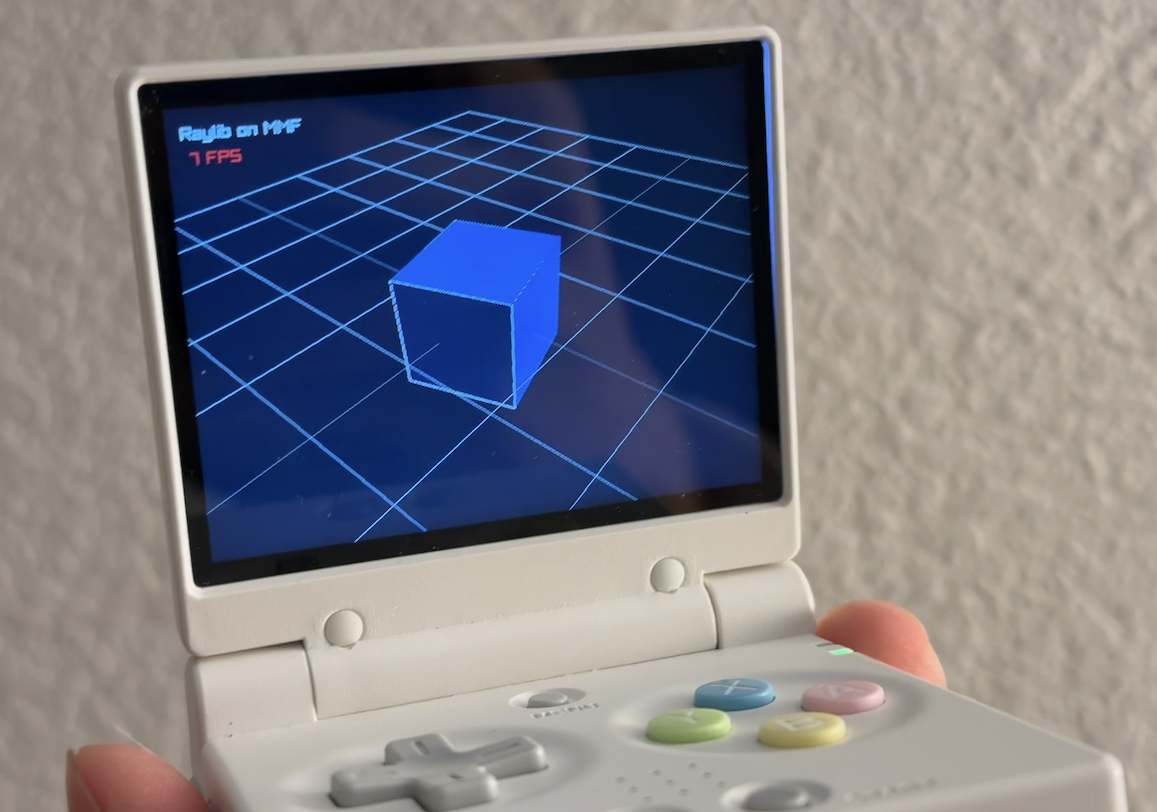
Swapping the software renderer
PLATFORM_MEMORY requires that we use a software renderer, which by default wires to Raylib’s own rlsw. This young library renders into its own internal framebuffer, then you must call glReadPixels (via rlCopyFramebuffer) to transfer it to system memory every frame. I could confirm that it was the bottleneck: When I skipped the copying step (so the frames are rendered but never sent to the display), the FPS jumped to 25 FPS immediately.
Fortunately, rlsw implements OpenGL 1.1. This version was released in 1997, when 3D rendering still heavily relied on CPUs. Even GPUs were, quoting Reddit, “often actually an esoteric CPU running a software rasterizer.” Therefore, this legacy edition has long been a popular target for software-based renderers. To us, this means there are replacements.
One of such replacements is TinyGL, which debuted in 2002. Compared to rlsw, which was introduced only in 2025, TinyGL had more time to polish. Most prominently, it renders directly into platform.pixels, so there’s no memory copy involved. I decided to swap rlsw with TinyGL.
To make them cooperate, I had to patch both TinyGL and Raylib, in addition to some build-time wiring & stubbing. Finally, it was time to switch the RAYLIB_GRAPHICS flag — We gave something to Raylib that is so mature and usable that we could switch it from “use the built-in software rasterizer” (GRAPHICS_API_OPENGL_SOFTWARE) to “use a provided OpenGL 1.1 API” (GRAPHICS_API_OPENGL_11). It felt like a great achievement.
The result speaks for itself: Frame rate jumped to 25 FPS.
What’s next?
I plan to write about how I managed to port my dice roller from THREE.js to this little device, which I teased about in my previous post. Although we are only half way there, this is a good point to take a pause: Compared to a journey of how a specific app is built, the proof that a whole framework can run on budget gaming consoles will inspire more readers.
I hope you are one of them. If you have a made something with Raylib and only played it on a computer, try putting it on a cheap handheld. It will feel different in your palms — I promise.